Digital Signage for Meeting Room Status vs. Traditional Booking Displays: 5 Key Differences (2026)
Introduction
You know the scene. You're rushing to a meeting, coffee in hand, only to find someone already in the room you booked. Or worse—you walk into an empty room that the calendar says is occupied, and you're left wondering if the person ever showed up.
If you're comparing digital signage for meeting room status with traditional booking displays, you're in the right place. This guide breaks down the five differences that matter most—from real-time occupancy updates to walk-up booking and total cost of ownership.
If this sounds familiar, you're not alone. According to a Steelcase study, offices using room display panels report 25% fewer scheduling conflicts and 30% higher employee satisfaction with meeting room availability compared to offices using software alone.
The root of the problem often isn't the booking software—it's the display sitting outside the room. Many offices still rely on traditional booking displays: paper schedules taped to doors, static whiteboards, or generic tablets running basic calendar views. These solutions were adequate five years ago. But in 2026, they're creating more friction than they solve.
Enter modern meeting room signage—purpose-built digital displays that do far more than show a calendar. They sync in real time, light up with tri-color LEDs, support face recognition check-in, and integrate with your entire workplace ecosystem.
This guide compares meeting room signage vs. traditional booking displays across five key dimensions. By the end, you'll know exactly which solution fits your office—and why upgrading might be the smartest decision you make this year.
What Are We Comparing?
Before diving into the differences, let's define the two categories.
Traditional Booking Displays
These include:
- Paper schedules printed daily (or weekly) and taped to meeting room doors
- Static whiteboards where room status is written and erased manually
- Generic tablets running basic calendar views without dedicated room management software
- Simple LED status lights that show red/green but offer no scheduling functionality
The common thread: They're either static, manual, or repurposed hardware not designed for room scheduling.
Modern Meeting Room Signage
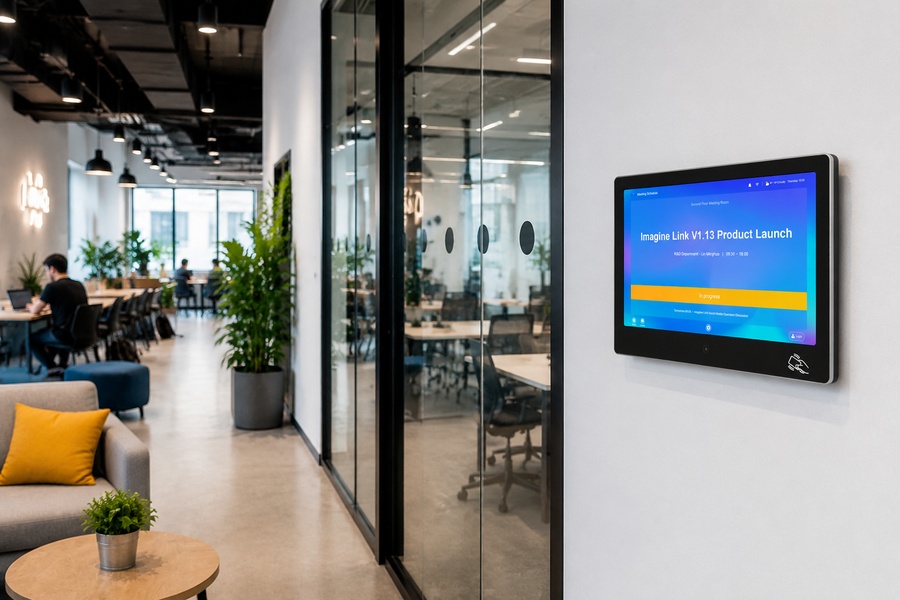
These are purpose-built digital displays mounted outside meeting rooms, typically featuring:
- A dedicated screen (10.1-inch is the industry standard)
- Tri-color LED strips (red/green/blue) visible from down the hall
- Real-time calendar sync with Google Workspace, Microsoft 365, and enterprise platforms
- Touchscreen interaction for walk-up booking and check-in
- Advanced features like face recognition, IC/ID card reading, and IoT integration
The common thread: They're built specifically for one job—managing meeting room status—and they do it exceptionally well.
5 Key Differences: Meeting Room Signage vs. Traditional Booking Displays
Difference #1: Real-Time Status Updates
| Aspect | Traditional Booking Displays | Modern Meeting Room Signage |
|---|---|---|
| Update mechanism | Manual (paper changes, whiteboard erasing) | Automatic (calendar sync) |
| Update speed | Hours or days | Seconds |
| Accuracy | Often outdated by the time you arrive | Always current |
| Double-booking prevention | None | Real-time conflict detection |
Traditional displays rely on humans to update them. Someone has to print a new schedule, erase a whiteboard, or manually adjust a tablet view. When a meeting gets moved or cancelled at the last minute—which happens 40% of the time in corporate environments—the display remains wrong. Employees walk to rooms that are either empty but "booked" or occupied but "available."
Modern meeting room signage pulls data directly from your calendar system. When someone books, changes, or cancels a meeting in Google Calendar or Outlook, the display updates automatically. No manual intervention required. The status you see is the status that's true—right now.
Difference #2: Visual Status Indicators
| Aspect | Traditional Booking Displays | Modern Meeting Room Signage |
|---|---|---|
| Visibility | Must walk up to read | Visible from down the hall |
| Color coding | None or single color | Tri-color (red/green/blue) |
| Status at a glance | No | Yes |
| Door-knocking eliminated | No | Yes |
This is where modern meeting room signage truly shines.
Traditional displays require employees to walk up to the door and read text to determine room status. This leads to the dreaded "door-knocking" interruption—someone peeking into an ongoing meeting to ask if the room is free.
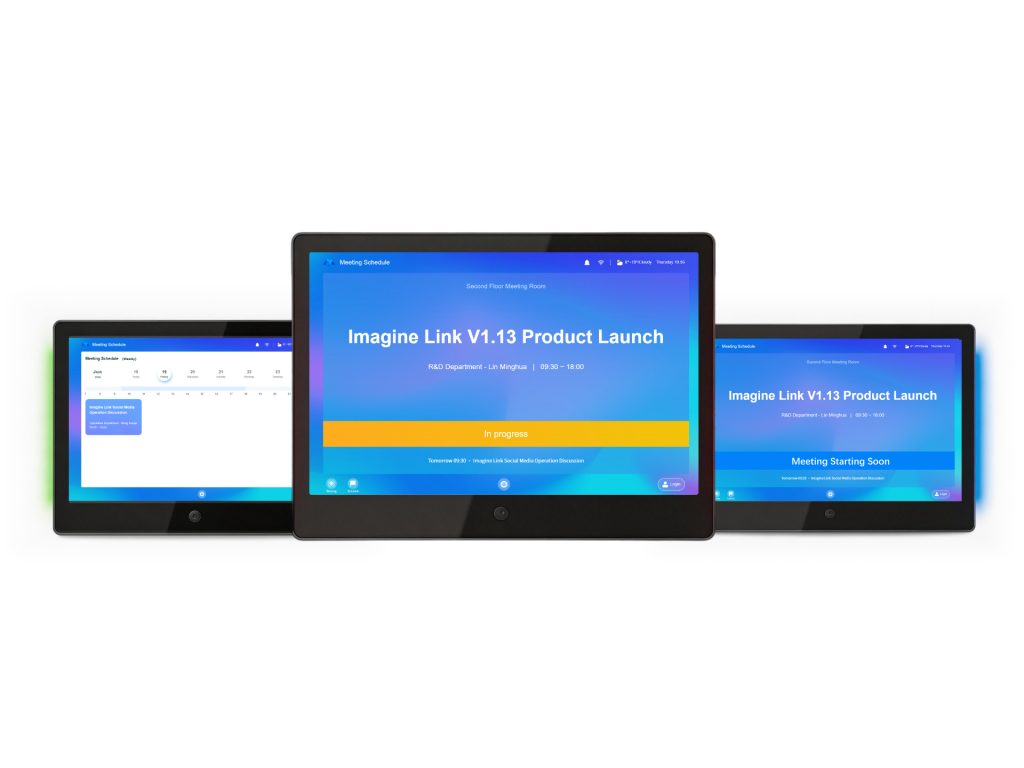
Modern meeting room signage features tri-color LED strips on both sides of the display. Green means available, red means occupied, and blue or yellow means the room is about to be booked for an upcoming meeting. Employees can see the room's status from 30 feet away without approaching the door.
Difference #3: Interactivity & Walk-Up Booking
| Aspect | Traditional Booking Displays | Modern Meeting Room Signage |
|---|---|---|
| Touchscreen | Rarely | Standard (10-point capacitive) |
| Walk-up booking | No | Yes |
| Check-in capability | No | Yes (face recognition or card swipe) |
| Extend/release meetings | No | Yes |
| Door access integration | No | Yes (face recognition unlock) |
Traditional displays are passive. They show information but don't accept input. If you walk up to an available room, you can't book it on the spot. You have to pull out your phone, open the booking app, and reserve it—assuming you remember the room name.
Modern meeting room signage is interactive. A 10-point capacitive touchscreen allows employees to:
- Book the room instantly if it's available
- Check in to confirm attendance (releasing the room if no one shows)
- Extend a meeting if the room remains available
- Release a room early if the meeting ends ahead of schedule
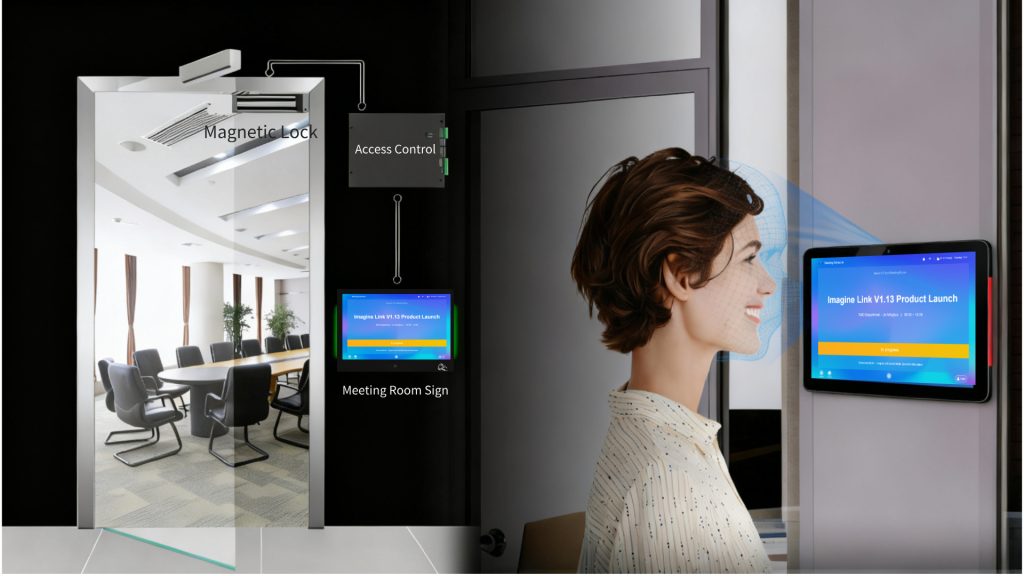
Advanced solutions also support face recognition for door access and check-in. Upon successful recognition, the door lock disengages automatically, and attendance is reported in real time. Integration with access control, lighting, and HVAC creates a seamless "arrive, open, ready" experience.
Difference #4: Integration with Your Ecosystem
| Aspect | Traditional Booking Displays | Modern Meeting Room Signage |
|---|---|---|
| Calendar sync | None or limited | Full (Google, Microsoft 365, Exchange) |
| Enterprise OA integration | None | Yes (DingTalk, WeCom, Feishu) |
| API support | No | Yes (for private OA systems) |
| IoT device integration | No | Yes (access control, lighting, AC) |
| Remote management | No | Yes (OTA upgrades) |
Traditional displays exist in isolation. A paper schedule doesn't talk to your calendar. A whiteboard doesn't know when someone books a room online. This creates data silos—the display shows one thing, the calendar shows another, and employees don't know which to trust.
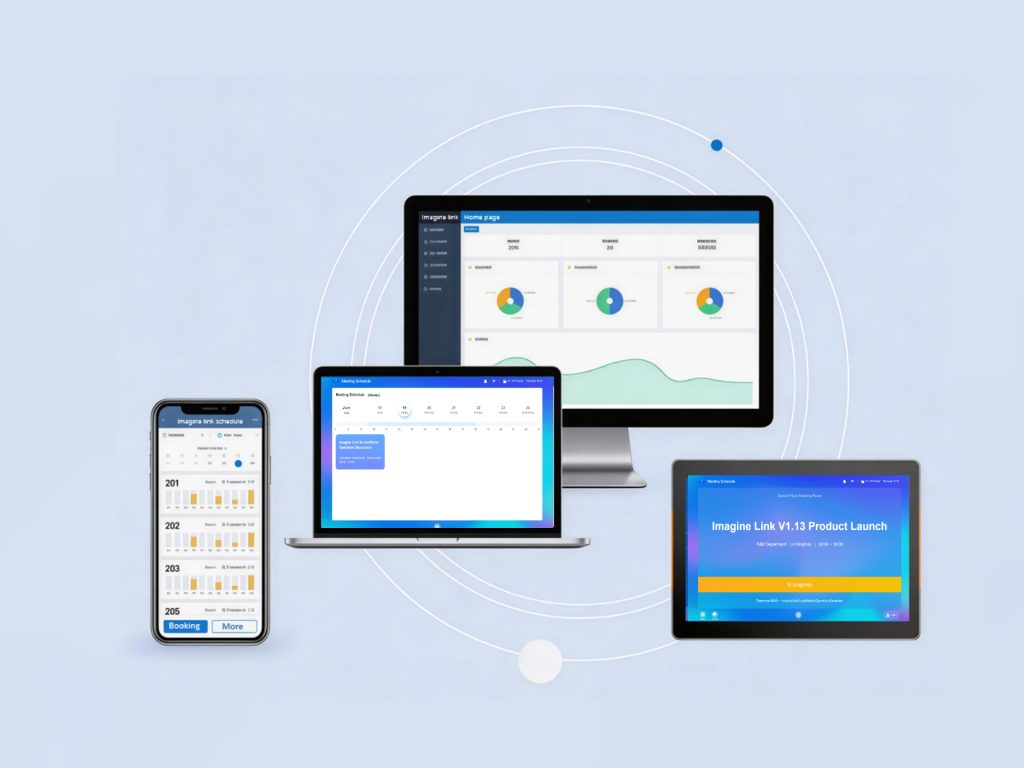
Modern meeting room signage is fully integrated. It connects directly to:
- Google Workspace (Google Calendar)
- Microsoft 365 (Outlook/Exchange)
- Enterprise platforms like DingTalk, WeCom, and Feishu
- Private enterprise OA systems via API access
When a meeting is booked, changed, or cancelled in any of these systems, the display updates automatically. No data silos. No confusion.
Beyond calendar integration, modern signage can also connect to IoT devices—access control systems, lighting, and HVAC—creating a truly smart meeting experience.
Difference #5: Total Cost of Ownership (TCO)
| Cost Factor | Traditional Booking Displays | Modern Meeting Room Signage |
|---|---|---|
| Hardware | Low ($0–$300 per room) | Moderate ($500–$1,500 per room) |
| Installation | Minimal | Moderate (wall mounting, network) |
| Ongoing labor | High (daily manual updates) | Low (automatic) |
| Software licensing | None or low | Moderate (annual) |
| Wasted time/productivity loss | High (hidden cost) | Low |
| Room utilization | Poor (20–30% idle) | Optimized (20–30% improvement) |
| 5-year TCO | Often higher due to hidden costs | Often lower due to efficiency gains |
At first glance, traditional displays seem cheaper. A paper schedule costs pennies. A basic tablet costs a few hundred dollars. But the hidden costs add up quickly.
Hidden costs of traditional displays:
- Administrative time: Someone must print and post schedules daily. At even 15 minutes per room per week, this adds up to 10+ hours per week for a 10-room office.
- Productivity loss: Employees waste 5–10 minutes per day searching for available rooms.
- Ghost meetings: Booked rooms that go unused waste valuable space. One study found that offices with room displays report 25% fewer scheduling conflicts.
- Missed opportunities: Underutilized rooms mean you might need more office space than you actually require.
Modern meeting room signage eliminates these hidden costs:
- Automatic updates: No manual intervention required.
- Instant status visibility: Employees find rooms faster.
- Check-in enforcement: No-shows release the room for others.
- Utilization analytics: You can track which rooms are used (or underused) and optimize your office footprint.
Companies using digital signage meeting room solutions often report a 20–30% improvement in room utilization—potentially delaying or avoiding costly office expansion.
Side-by-Side Comparison: At a Glance
| Feature | Traditional Booking Displays | Modern Meeting Room Signage |
|---|---|---|
| Real-time calendar sync | ❌ Manual | ✅ Automatic |
| Tri-color LED status | ❌ None | ✅ Red/Green/Blue |
| Visible from down the hall | ❌ No | ✅ Yes |
| Touchscreen interaction | ❌ Rare | ✅ Standard |
| Walk-up booking | ❌ No | ✅ Yes |
| Face recognition check-in | ❌ No | ✅ Yes |
| IC/ID card reader | ❌ No | ✅ Yes |
| OA/calendar integration | ❌ Limited | ✅ Full |
| IoT device integration | ❌ No | ✅ Yes |
| OTA remote upgrades | ❌ No | ✅ Yes |
| Low power consumption | ❌ Varies | ✅ ≤10W operating, ≤1W standby |
| Ultra-slim design | ❌ Varies | ✅ 13mm wall-mountable |
Which Solution Is Right for Your Office?
The choice depends on your office size, budget, and pain points.
Choose Traditional Booking Displays If:
- You have 1–2 meeting rooms and minimal scheduling complexity
- Your team is small and everyone knows each other's schedules informally
- You have no budget for hardware or software
- You're willing to accept the hidden costs of manual updates and wasted time
Choose Modern Meeting Room Signage If:
- You have 3+ meeting rooms and scheduling conflicts are common
- Employees waste time searching for available rooms
- You want to eliminate double-bookings and ghost meetings
- You need real-time visibility into room utilization
- You're committed to creating a professional, modern office experience
- You want to integrate with your existing calendar and OA systems
For most offices with more than a handful of meeting rooms, modern meeting room signage pays for itself within months through improved efficiency and utilization.
Still unsure which solution fits your needs? Contact our team for a free consultation—we'll help you assess your office requirements and recommend the right meeting room signage solution.
What to Look for in a Meeting Room Signage Solution
If you're ready to upgrade, here's what to prioritize:
1. Calendar Integration
Ensure the solution supports Google Workspace, Microsoft 365, and Exchange—plus any enterprise platforms your organization uses (DingTalk, WeCom, Feishu).
2. Tri-Color LED Status
Look for red/green/blue LED strips on both sides of the display. This is the single most visible feature that eliminates door-knocking.
3. Touchscreen Interaction
A 10-point capacitive touchscreen enables walk-up booking, check-in, and meeting management.
4. Advanced Check-in Options
Face recognition and IC/ID card reading streamline attendance and eliminate no-shows.
5. Low Power Consumption
Look for devices operating at ≤10W with standby power of ≤1W—essential for always-on deployment.
6. Ultra-Slim Design
A 13mm profile that mounts flush against the wall creates a clean, professional look.
7. OTA Remote Upgrades
Over-the-air firmware updates ensure your devices stay current without physical intervention.
👉 Want to start from the basics? Check out our first guide: What Is Digital Signage for Meeting Room Status? A Complete Guide for 2026.
Frequently Asked Questions
What is the difference between meeting room signage and digital signage?
Meeting room signage is a dedicated, interactive display for room scheduling and status. Digital signage is a broader category of passive screens used for corporate communications, announcements, and wayfinding. They serve different purposes—one manages spaces, the other broadcasts messages.
Can meeting room signage integrate with my existing calendar?
Yes. Modern meeting room signage integrates with Google Workspace, Microsoft 365, Exchange, DingTalk, WeCom, and Feishu—with API support for private enterprise OA systems.
Is meeting room signage difficult to install?
No. Most solutions use standard wall-mount brackets with ultra-slim designs (as thin as 13mm). Installation typically takes 1-2 weeks from order confirmation, including hardware setup and platform configuration.
How much does meeting room signage cost?
Hardware typically ranges from $500–$1,500 per room, with ongoing software licensing. However, the 20–30% improvement in room utilization and elimination of administrative overhead often means the solution pays for itself within months.
What size display do I need?
10.1-inch is the industry standard—offering the optimal balance of visibility, readability, and footprint.
What is digital signage for meeting room status?
Digital signage for meeting room status is a display installed outside a meeting room that shows real-time availability, occupancy, and schedule information. Modern systems sync with calendars, support check-in, and integrate with IoT devices.
Conclusion
Traditional booking displays are cheap upfront but costly over time. They create friction, waste time, and leave employees frustrated.
Modern meeting room signage is an investment that pays for itself. It eliminates scheduling chaos, boosts room utilization by 20–30%, and creates a professional impression that reflects well on your entire organization.
The question isn't whether you can afford to upgrade. The question is whether you can afford not to.
Meeting room signage vs. traditional booking displays isn't really a contest. One is built for the way offices worked five years ago. The other is built for the way offices work today—and will work tomorrow.
By upgrading to modern meeting room signage, you eliminate the daily frustrations of double-bookings, ghost meetings, and door-knocking interruptions. You give employees the clarity they need to work efficiently. And you gain the data insights to optimize your office space for years to come.
The choice is clear. It's time to leave traditional booking displays behind.
Ready to see how meeting room signage can transform your office? Explore the Meeting Room Sign from ImagineLink—a 10.1" wall-mounted display with tri-color LED, face recognition check-in, and seamless integration with Microsoft Office 365, Google Calendar, DingTalk, WeCom, and Feishu.